



Tutorial: How to use live if your connected via wireless but have an Ethernet cable and a ethernet socket in your pc by Three
Step one:
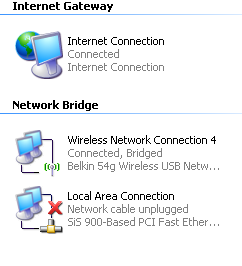
Boot up your computer, Then click Start > Connect To > Show all connections it should look like this:
But instead of network bridge at the top it should say Lan or High Speed internet.
Don't matter if it doesn't show much aslong as it shows your ethernet port disconnected and your wireless network connected.
Step two:
Get your ethernet cable, put one end in your pc; and one end in your xbox 360 then on your xbox go to system > network settings > and test xbox live connection and it should say Wired on the first one, and ip address not assinged, know we are going to share the data from your wireless network and allow it to broudcast via ethernet to your xbox 360 and allowing you to play live!
Step three:
The bridging, this is slighty harder part,
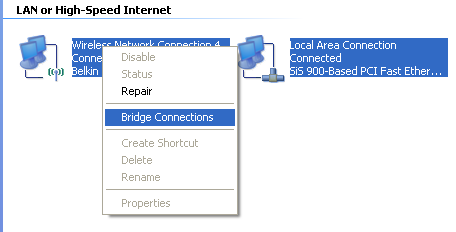
I want you to open network neighbourhood; click Start > Connect To > Show all connections and then make sure both of the ethernet and the wireless are enabled, i want you to highlight them both and right click (left click for left handers!) this should open up a menu and it should look like this:
Click bridge connections, then it should say please wait while windows bridges these connections and it should disconnect you and connect to your wireless network, and then your computer ethernet still connected to your pc, you can go to system > network settings > and test xbox live connection and do all the test it will skip wireless because your wired via ethernet to your computer.
If everything loads on the test page you can tell your xbox what your live gamertag is, and if you need any 48 hour codes i'm here for you.
Downers:
+ If your wireless cuts out, so does your xbox live
+ if your computer is off, so if your live
Upsides:
+ No need for spending £56 on a wireless adapter
+ Easy to do and clutter free as your only using a little cable
+ Fast and easy
I hope you like my tutorial, i found it by accident and it worked >.<
Need any help, pm me, or post in the thread.
peace, three.
Thread stuck by Agesilaus (Forum Super Moderator): Helpful thread stuck with the permission of Elkaa.



Results 1 to 10 of 28
-
 Tutorial: How to use live if your connected via wireless but have an ethernet cable
Last edited by Agesilaus; 28-01-2008 at 08:50 AM.
-
15 views no comments ;[
-
v nice rep i use this method
 Tottenham Till I Die.TO DARE IS TO DOCOYS:eusa_clap
-
Wow
Thats great man, thanks alot
It doesnt affect me but its very good though man, this thread should be STUCK, cos theres tons of posts about " How to connect with Ethernets "
Well done man
+rep
-
Nice guide mate, nice of you to invest some of your time in producing it. Gonna give my mate the link see how he gets on.
Also known as that charming, handsome, young fellow SHEEPY.
-
I'm surprised you did so much detail mate, but still im glad i have a wireless adaptor ;D
-
i done it this way easyer and cheaper ;D
Tottenham Till I Die.TO DARE IS TO DOCOYS:eusa_clap
-
I have got professional screen recording software (camtasia) and i could make a video tutorial with my microphone too ^_^
-
Please do.
Very nice guide but I still prefer wireless .
.
-

 Reply With Quote








 Posting Permissions
- You may not post new threads
- You may not post replies
- You may not post attachments
- You may not edit your posts